 Plotra Docs
Secrets and continuity checks
Track which character knows which secret and where they learn it, pair every setup with its payoff, and let plain rules find the contradictions in your story.
Two views keep the inside of the story straight. Secrets & setups records who knows what, and what has been set up and not yet paid off. Continuity runs fixed rules over the project and lists what contradicts itself.
Secrets & setups needs the Releases & reveals module, and Continuity needs World bible. Turn them on in the Modules tab of Project settings.
Who knows what
The Secrets & setups view tracks knowledge inside the story. Open it from the ribbon (Secrets) or with "Open secrets & setups" in the command palette. It needs the Releases & reveals module. It has three tabs.
Knowledge layers
A fact can be the truth, or a belief: a false version that people are led to believe, such as a lie, propaganda or an unreliable narrator. Set the layer of a note with the Truth / Belief buttons in the Story tab, and of a block in the tag dialog. Everything is truth until you say otherwise.
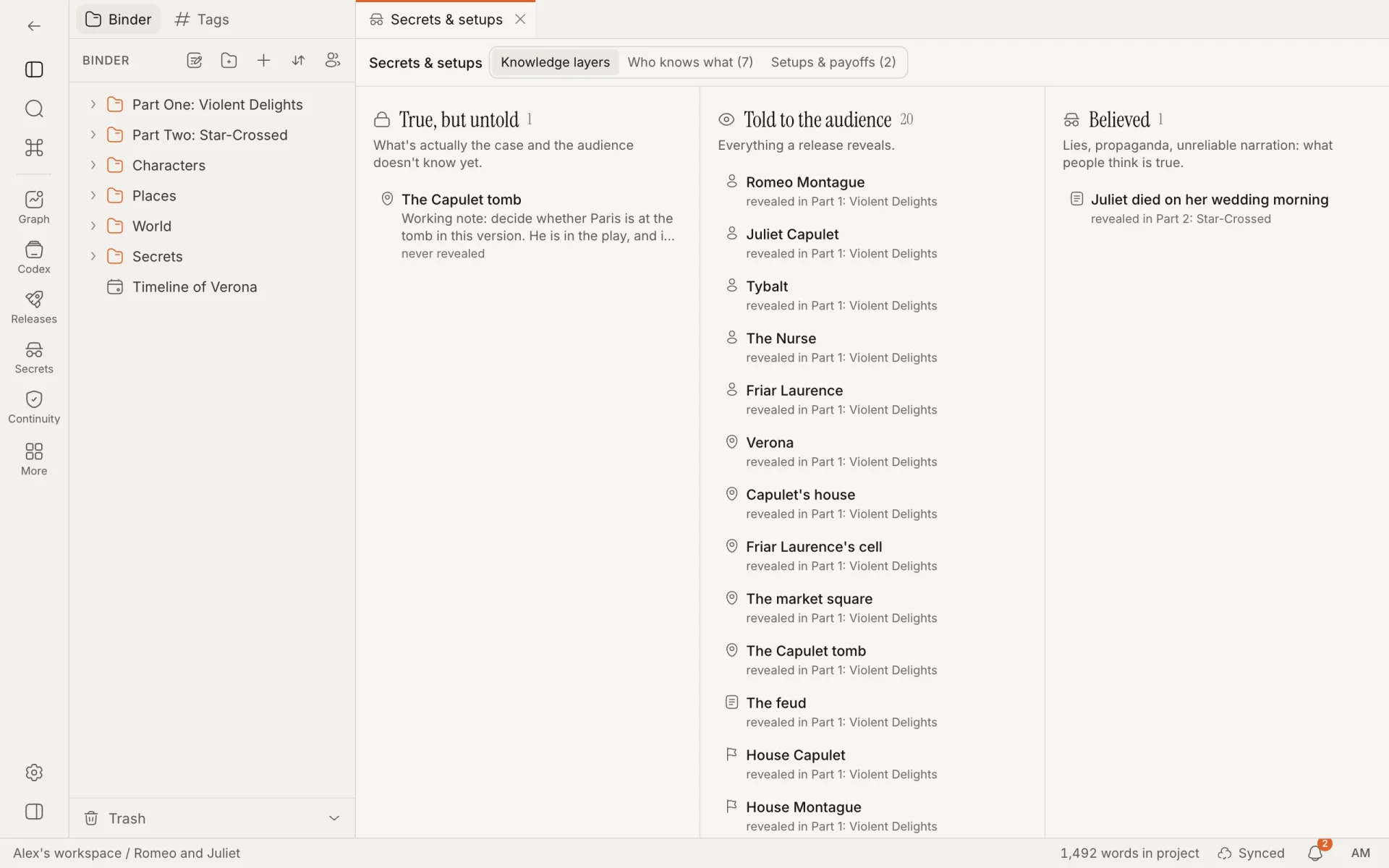
The tab sorts the world into three columns:
| Column | Holds |
|---|---|
| True, but untold | What is the case and the audience doesn't know yet. |
| Told to the audience | Everything a release reveals. Under a spoiler horizon it is Told by this point: what the audience knows as of that release. |
| Believed | Notes and blocks on the belief layer. |
Each entry shows the note, the start of the text for a tagged block, and the release that reveals it. Click one to open the note. Folders, chapters, scenes, canvases, timelines and dialogues are not listed as notes, though their tagged blocks are. Each column shows up to 200 entries.
Who knows what
For each secret, record which characters know it and the scene where they learn it. This is what catches "how does she know that?" in chapter 20.
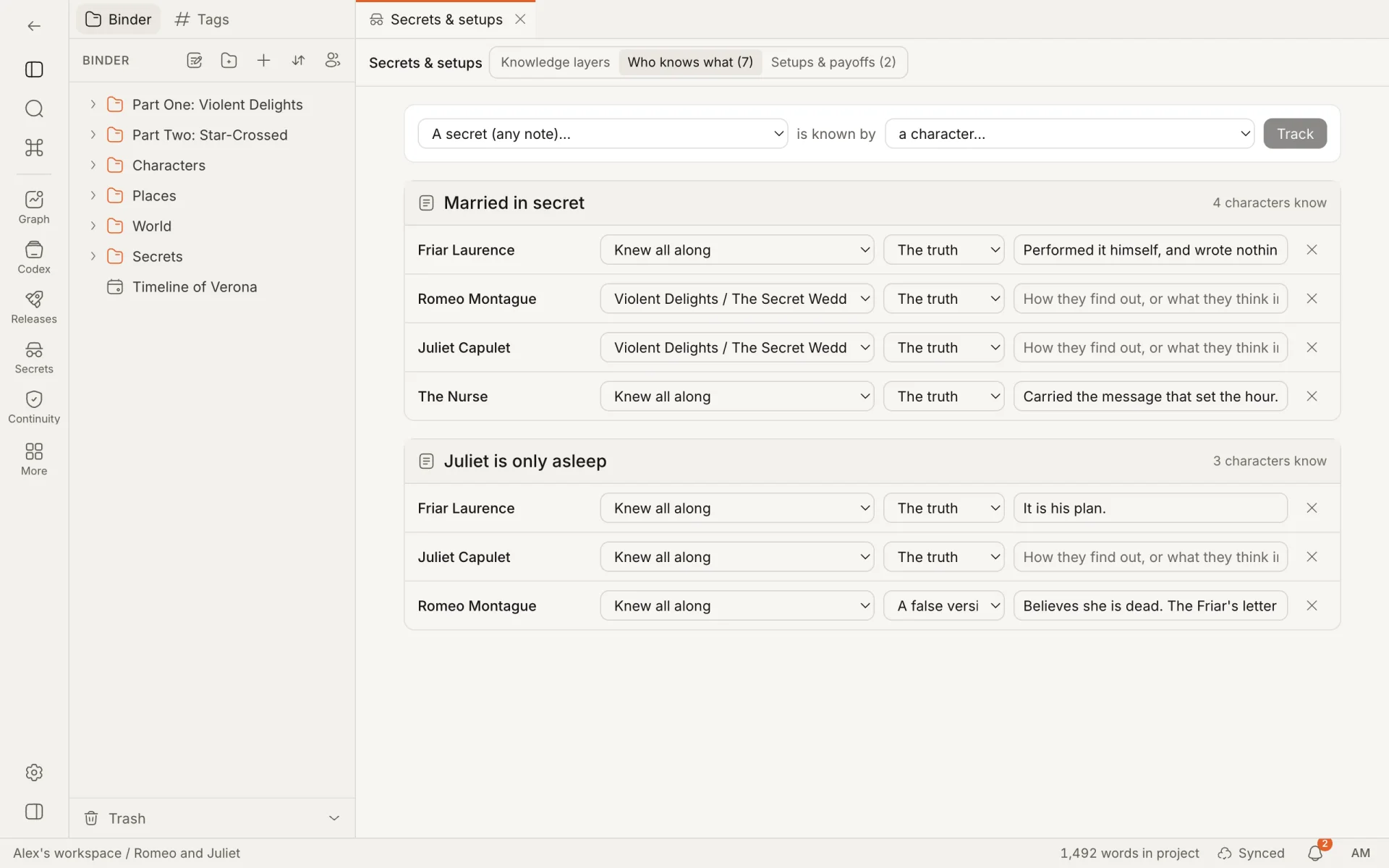
To track a secret, fill in the line at the top, "A secret (any note)… is known by a character…", and press Track. A secret is any note that isn't a folder; it is usually a note written for the purpose, or a world entry.
Secrets are listed with the characters who know them. For each character:
| Column | What it records |
|---|---|
| Learned in | The scene or chapter where they find out. "Knew all along" is the default. |
| What they know | "The truth", or "A false version". |
| Note | How they find out, or what they think instead. |
The cross removes the entry. In the campaign sample, Sister Wenna learns who set the fire in the mill scene ("Saw him leave the yard with a lantern"), while the guard captain holds a false version: he was told it was an accident.
These entries feed the continuity check "Knows something before learning it" and the Learns column of the character sheets.
Setups and payoffs
Track what you plant and where it pays off. Setup in the toolbar adds a row.
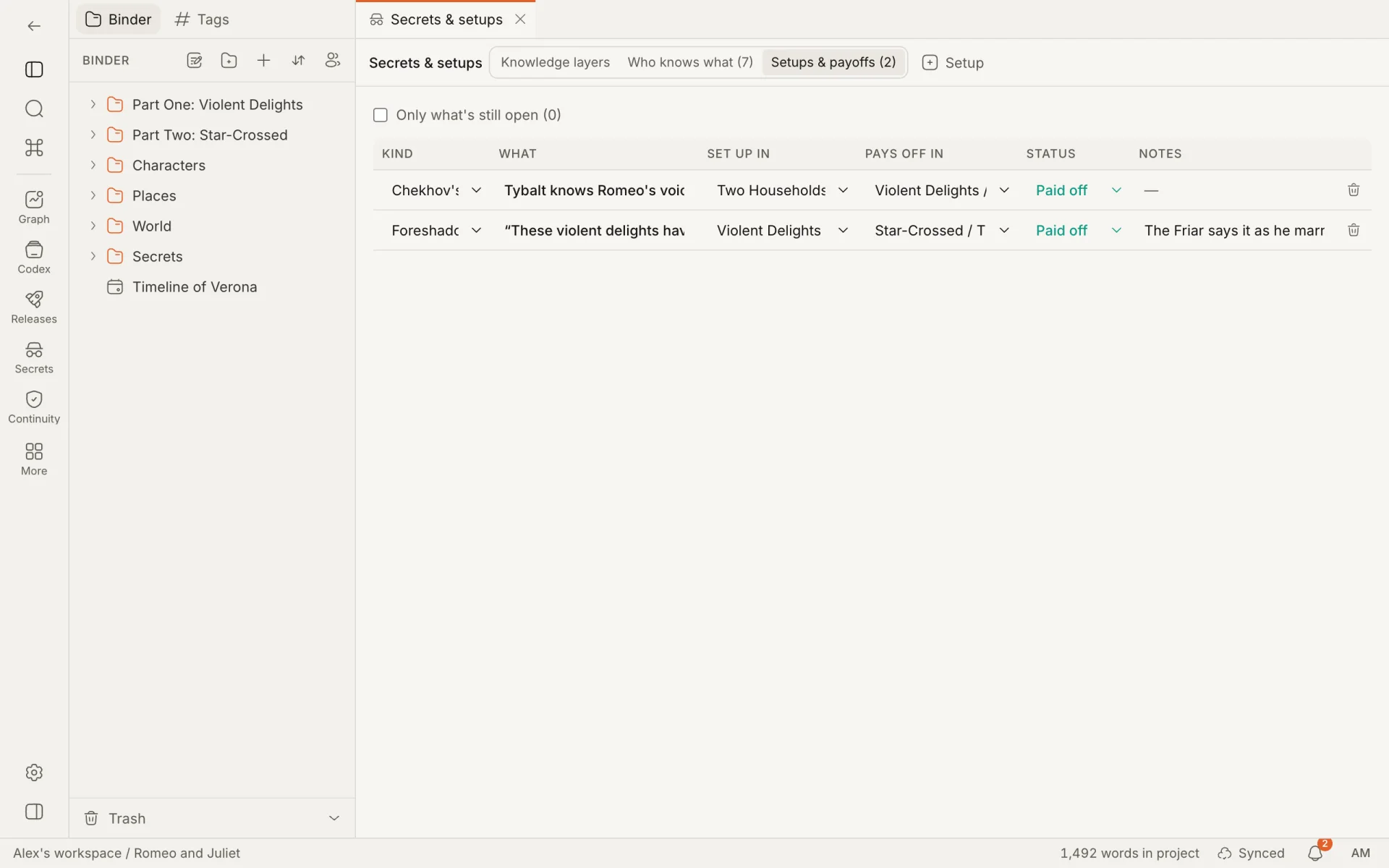
| Column | What it holds |
|---|---|
| Kind | Foreshadowing, Chekhov's gun, Clue, Red herring or Mystery. |
| What | A name for it: "Lamp oil on the reeve's cuffs". Up to 80 characters. |
| Set up in | The note where it is planted. "Not planted yet" until you choose. |
| Pays off in | The note where it pays off. "No payoff yet" until you choose. |
| Status | Open, Paid off or Dropped. Choosing a payoff marks the setup Paid off. |
| Notes | Anything else. |
An open setup shows how long it has been waiting: "open for 12 scenes" counts the scenes after the one it was planted in. Only what's still open hides the rest. The bin deletes a row.
Open setups, and payoffs that come before their setup, are also reported by the continuity checks.
Continuity checks
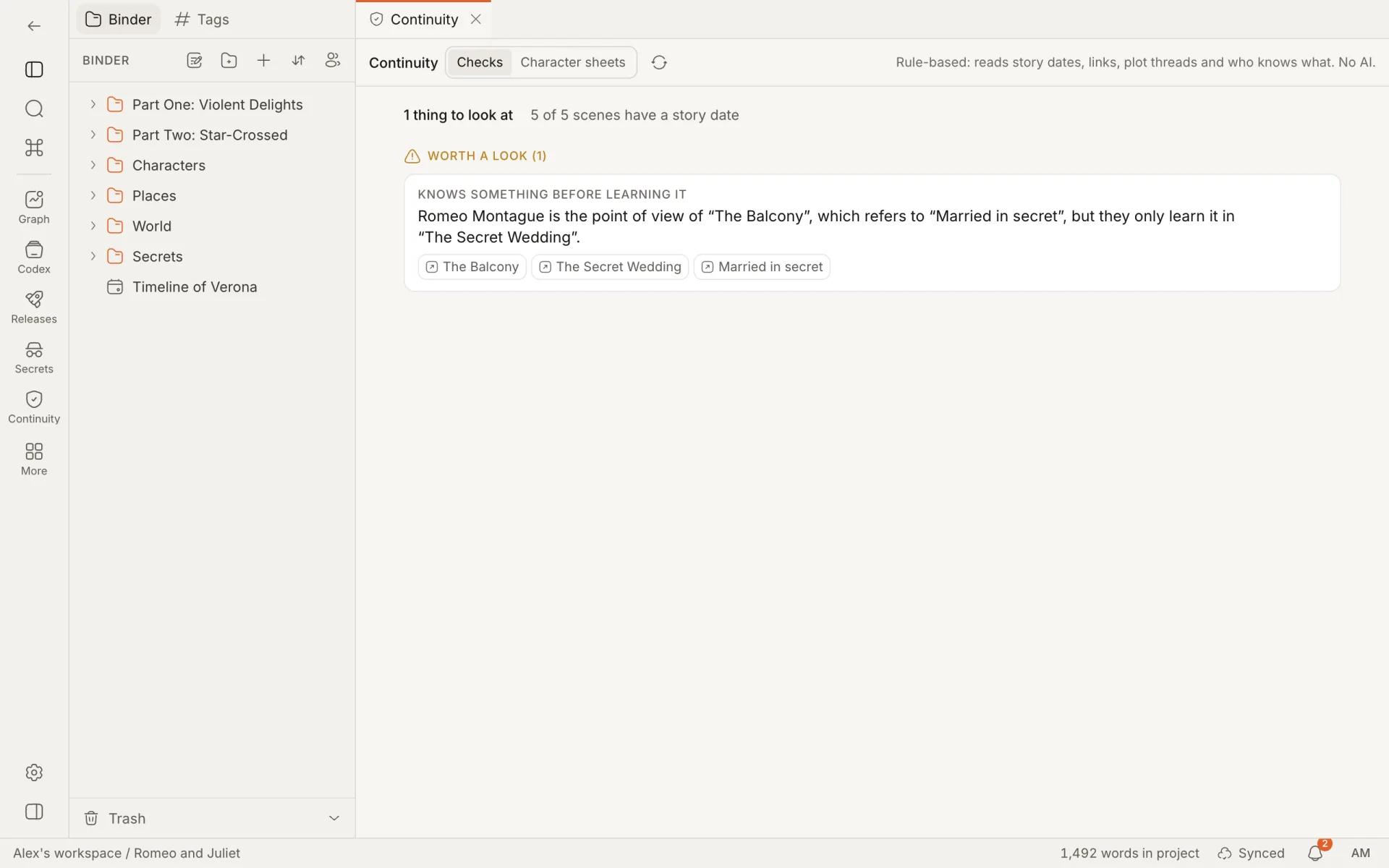
The Continuity view runs a set of plain rules over the project. Open it from the ribbon or with "Open continuity" in the command palette. It needs the World bible module. There is no AI in it, nothing leaves your project, and the same project always gives the same answer.
What the checks read
- Scenes: the Story date, Duration, POV and Location properties.
- Characters: the Born, Died, Age and First appearance properties.
- Links: every
[[link, embed and note-valued property. - Plot threads: which scenes are in a thread, and the scene it is Resolved in, from the Plot grid. See Planning views.
- Who knows what and Setups and payoffs, from Secrets & setups.
- Canon status.
A character is in a scene when they are its POV, or the scene links to them.
Write story dates as YYYY-MM-DD, with a time if you need one. In a project with a calendar of its own, month names work too ("4 Frostmonth 312"). When the project has custom calendars, a Calendar menu in the toolbar chooses the one dates are read in. It starts as the calendar of the project's timeline and is remembered in your browser. See Timeline and canvas.
The checks can't find a problem in something you haven't recorded, and they don't read your prose. The line under the toolbar shows how many scenes have a story date.
The rules
Results are grouped as Contradictions, Worth a look and Notes.
| Rule | Group | Triggered when |
|---|---|---|
| Appears after death | Contradictions | A character is in a scene whose story date is after their Died date. |
| In two places at once | Contradictions | A character is in two dated scenes that overlap in time, counting each scene's Duration, and the scenes have different Location values. |
| Appears before birth | Worth a look | A character is in a scene that ends before their Born date. |
| Age doesn't match the timeline | Worth a look | A character's Age is a number that differs from the years between Born and their First appearance scene, or their earliest dated scene if that isn't set. Also when Died is before Born. |
| Closed plot thread referenced again | Worth a look | A scene is in a plot thread and comes later in the binder than the scene the thread was resolved in. |
| Knows something before learning it | Worth a look | A scene links to a secret, its POV character is recorded as learning that secret in another scene, and this scene comes first. Order is by story date when both scenes have one, otherwise by binder order. |
| Payoff comes before its setup | Worth a look | A setup's payoff note comes before its setup note in the binder. |
| Canon scene relies on something that isn't canon | Worth a look | A scene with the status Canon links to a note that is Retconned or Non-canon. |
| Setup still open | Notes | A setup with the status Open has a note it is planted in. The message counts the scenes since. |
| Story date can't be read | Notes | A scene's Story date is filled in and isn't a date in the chosen calendar. |
Scenes without a story date are skipped by the date rules. Two scenes need a location each to count as two places.
Working through the results
Each result names its rule, explains the problem and has a button for each note involved: click one to open it. After fixing something, press Check again in the toolbar.
- Rule filters the list to one rule. It appears when more than one rule has results.
- Dismiss, shown when you hover over a result, hides one that is intentional. Dismissals are stored in your browser for that project: they are not shared with co-writers and don't follow you to another device.
- Show dismissed brings them back into the list, faded, each with a Restore button.
A dismissed result stays dismissed for as long as the same notes are involved.
Continuity sheets
The Character sheets tab builds a sheet for each character from what the project already holds. Pick a character from the list on the left.
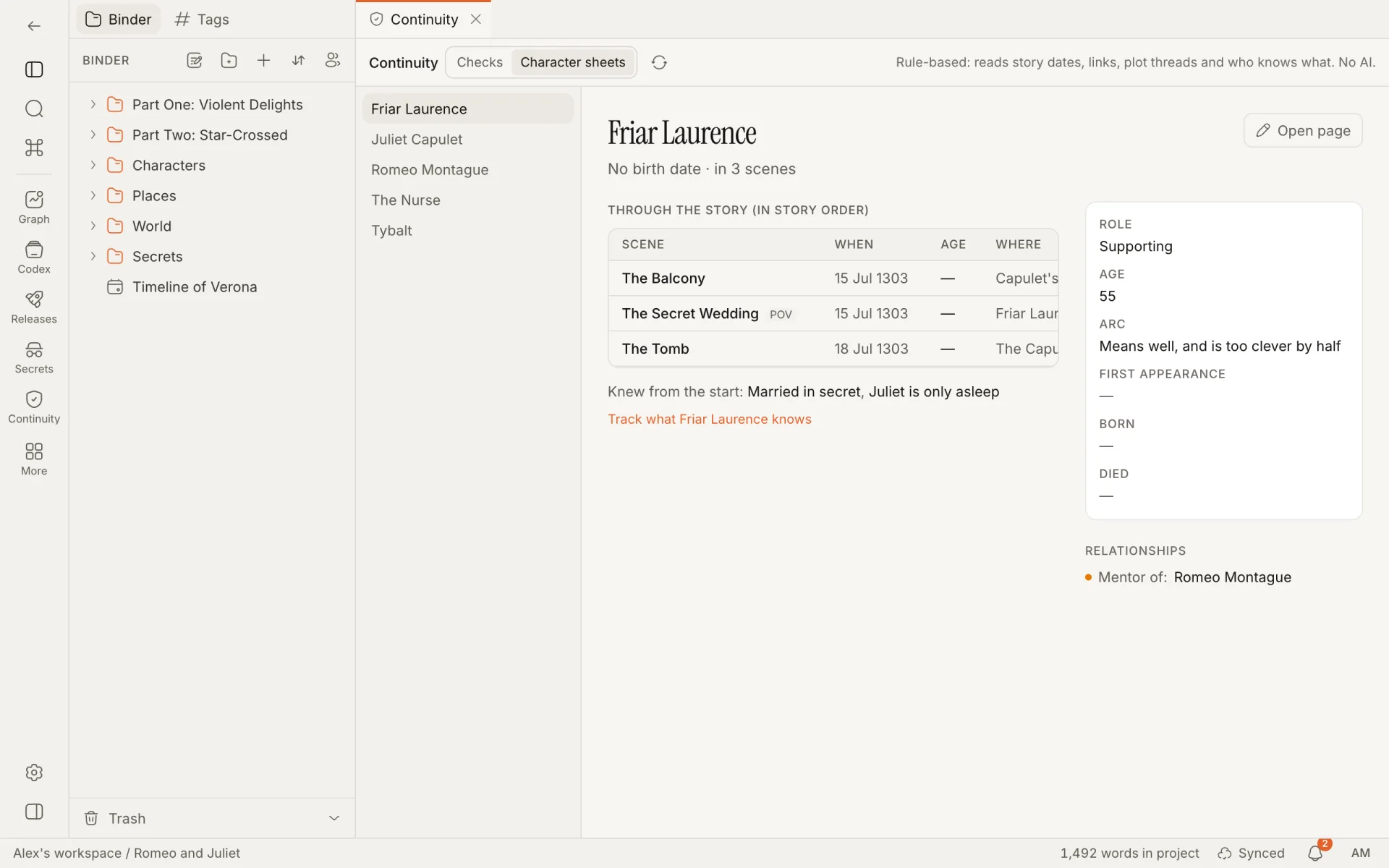
The heading shows their birth and death dates and how many scenes they are in. Open page opens the character's note.
Through the story lists every scene they are in, plus any scene where they learn something:
| Column | Shows |
|---|---|
| Scene | The scene, with a POV badge when they are its point of view. |
| When | The scene's story date. |
| Age | Their age then, from Born. "dead" in red if the scene is after their death. |
| Where | The scene's location. |
| Learns | The secrets they learn in that scene, marked "(a false version)" when it is one, with your note. |
The scenes are in story order when every one of them has a date, and in binder order otherwise; the heading says which. Below the table, Knew from the start lists secrets with no scene, and Track what … knows opens Secrets & setups.
Beside the table are the character's properties and their relationships from the Relationships view; click a related character to see their sheet.
How is this guide?
Releases, reveals and the spoiler horizon
Record what your story ships in and when the audience learns each thing, then see the whole project as readers know it at a given book, episode or session.
Working together
Write with co-writers live and get feedback without sending files. Who can do what, what happens when two people write at once, and where each tool is covered.