 Plotra Docs
Notifications and activity
Know when a co-writer needs you without watching the project. The bell, the activity feed, and choosing which notifications are emailed.
You don't have to keep checking a project to know what changed. Plotra tells you when something concerns you, and leaves the rest in the activity feed for when you want it.
The two are different things. A notification is addressed to you: someone mentioned you, answered you, or is waiting for you. The activity feed belongs to the project: everything that happened in it, for everyone who can open it.
The bell
The bell is in the status bar at the bottom of a project, and in the top bar on a phone. It lists what other people did that concerns you, in every project you can open, newest first. The number on it is how many you haven't read; past nine it shows "9+".
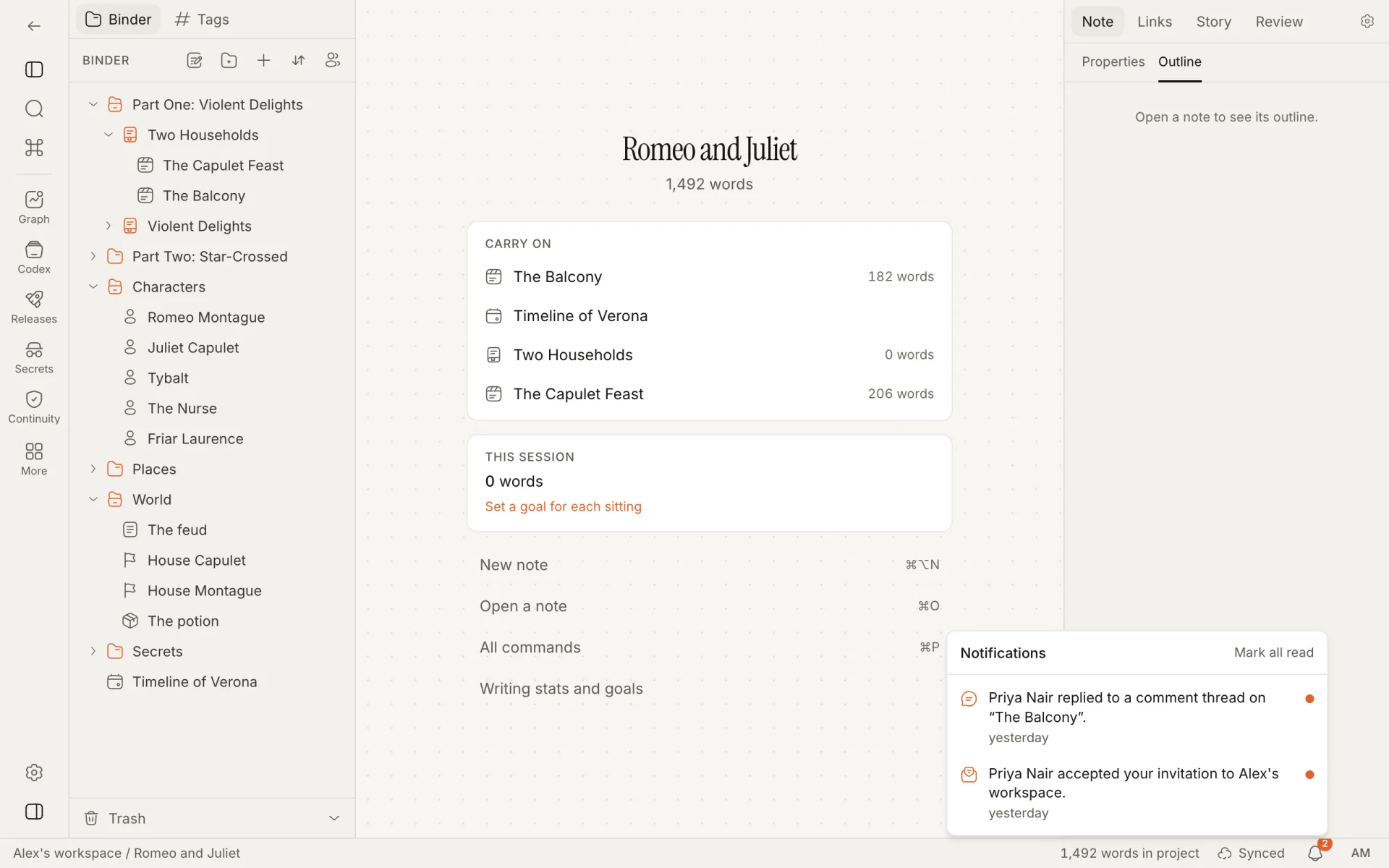
The bell is part of a project's window. The workspace's home page and your settings page have no bell.
What you are told about
There are six kinds of notification.
| You get one when someone | It reads | Who gets it |
|---|---|---|
Mentions you in a comment with @ and your name | "Name mentioned you in a comment on “Note”." | Each workspace member named in the comment |
| Replies in a comment thread | "Name replied to a comment thread on “Note”." | Whoever started the thread, and everyone who has commented in it |
| Shares a project with you | "Name shared “Project” with you as role." | The person it was shared with, if their account's address is verified |
| Accepts a workspace invitation you sent | "Name accepted your invitation to Workspace." | Whoever sent the invitation |
| Asks you to review a note | "Name asked you to review “Note”." | Each required reviewer of the note |
| Decides a review you asked for | "Name approved “Note”." or "Name asked for changes to “Note”." | Whoever sent the note for review |
A notification about another project than the one you have open ends with "in Project".
The rules behind them:
- You are never notified about your own actions.
- Nobody is told twice about one thing. If a reply mentions you, you get the mention and not also the reply.
- Only members of the workspace can be mentioned. Typing the name of someone a project is merely shared with notifies nobody. They do get replies in threads they took part in.
- One-click reactions don't notify anyone.
- Resolving a thread, editing a comment, a suggestion being made, accepted or rejected, and a role being changed send no notification.
- Review requests and decisions only happen with the Review & editorial module on; see Review and editorial.
- Someone invited to a project by email who has no verified account yet gets the email, and no notification under the bell.
Reading them
Click the bell to open the list. It holds your latest 40 notifications; unread ones are in full colour with a dot beside them, and each shows how long ago it happened. With none, the list says "Nothing yet. Mentions, replies, shares and review requests show up here."
Click a notification to open what it is about:
| Notification | Opens |
|---|---|
| A mention or a reply | The note, in a new tab, with the Comments panel on that thread |
| A review request or decision | The note, in a new tab, with its properties open in the inspector |
| Something in another project | That project, on the note |
| An accepted invitation | The workspace |
Opening a notification marks it read. Mark all read at the top of the list clears the count without opening anything. If the note has since been deleted, the notification is still marked read and nothing opens.
The list refreshes every half minute, when you come back to the browser tab, when you open it, and at once when someone in the project you have open comments or makes a review decision.
A notification holds names and titles only: who, what kind of thing, and which note. It never contains the text of a comment or a document. The title is the one the note had at the time.
The activity feed
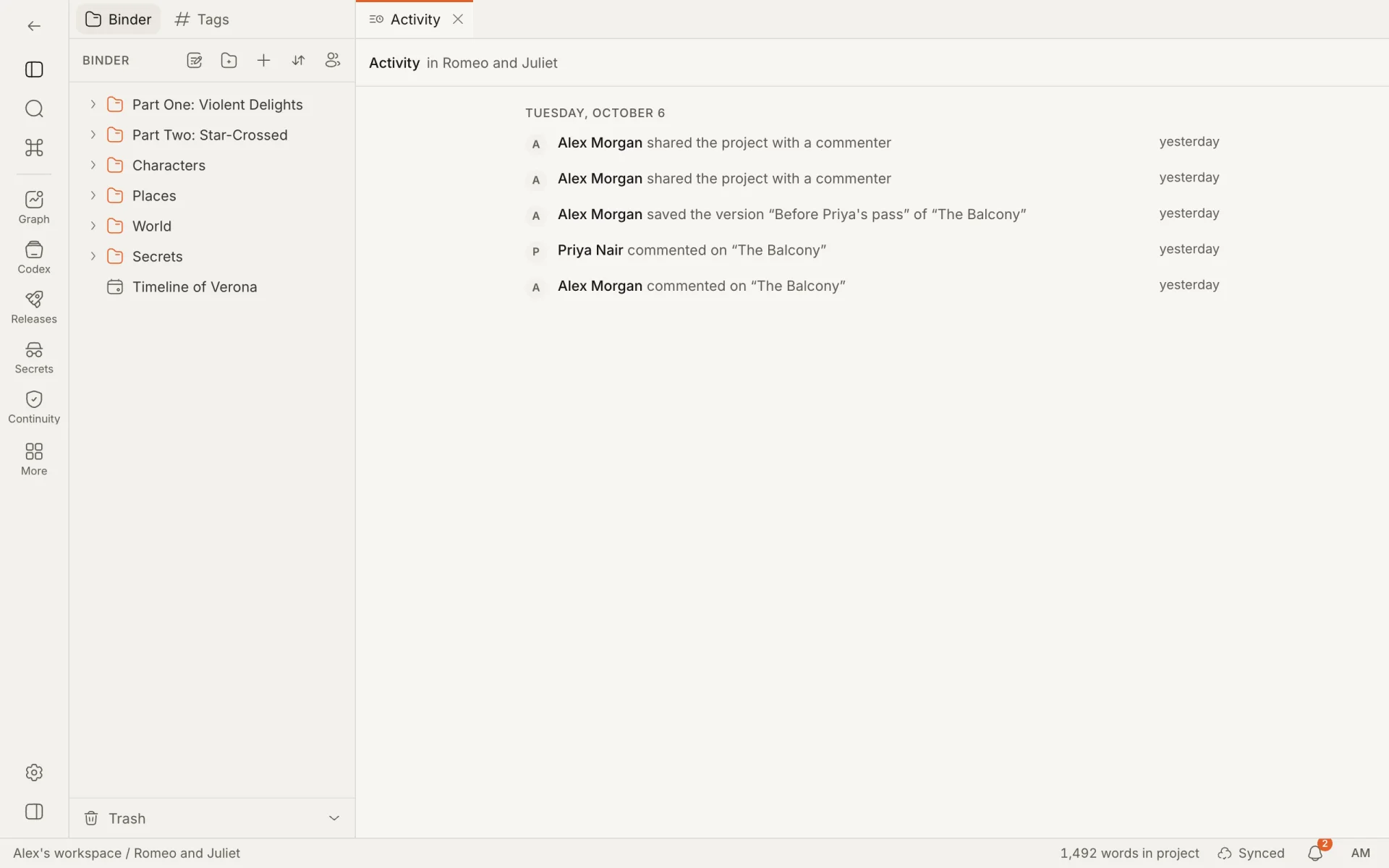
Open Activity from the ribbon, or run "Open activity feed" from the command palette. It lists what happened in the project, newest first, grouped under a heading for each day. Each row has the person's avatar and name, what they did, and how long ago.
What is in it
| When someone | The row reads |
|---|---|
| Creates a note | "created “Note”" |
| Renames a note | "renamed “Old name” to “New name”" |
| Moves a note to the trash | "moved “Note” to the trash" |
| Restores a note from the trash | "restored “Note” from the trash" |
| Starts a comment thread or replies in one | "commented on “Note”" |
| Saves a version with a name, or gives a version a name | "saved the version “Name” of “Note”" |
| Restores a version | "restored “Note” to “Name”", or "to an earlier version" for an unnamed one |
| Cuts a release | "cut the release “Release” (12 notes)", with the number of notes that were snapshotted |
| Shares the project | "shared the project with a viewer", "a commenter" or "an editor". The role is shown and the person's address is not. |
What is not in it
- Typing. For how much was written and when, see Writing goals.
- Moving a note, changing its status, properties or tags, and deleting it for good.
- Versions saved without a name, and automatic snapshots.
- Reactions, resolving a thread, and editing or deleting a comment.
- Suggestions being made, accepted or rejected.
- Changing someone's role, removing their access, and the read-only link being switched on or off.
- Changes to project settings.
Using it
- Everyone who can open the project sees the same feed: viewers, commenters, editors and workspace members.
- Titles are shown as they were at the time, so a renamed note appears under its old name in older rows.
- Click a row to open its note in a new tab, if the note still exists. Rows about the project as a whole (a release, a share) don't open anything.
- The feed shows 40 rows at a time. Show earlier activity at the bottom loads the 40 before those.
- It refreshes every half minute, and within a second of any change someone makes while you have it open.
- A row by someone whose account no longer exists reads "Someone".
- An empty project's feed says "Nothing has happened yet".
Like notifications, the feed records names and titles and never the text.
Notifications can also be emailed. Open your account menu, choose Your settings, and under Email notifications pick one:
| Setting | What you get |
|---|---|
| A daily digest | One email a day listing what you haven't read. No email on a day with nothing new. This is the default. |
| Each one | An email when it happens, up to twelve an hour. Anything past that waits for the next day's digest. |
| Off | No notification emails. |
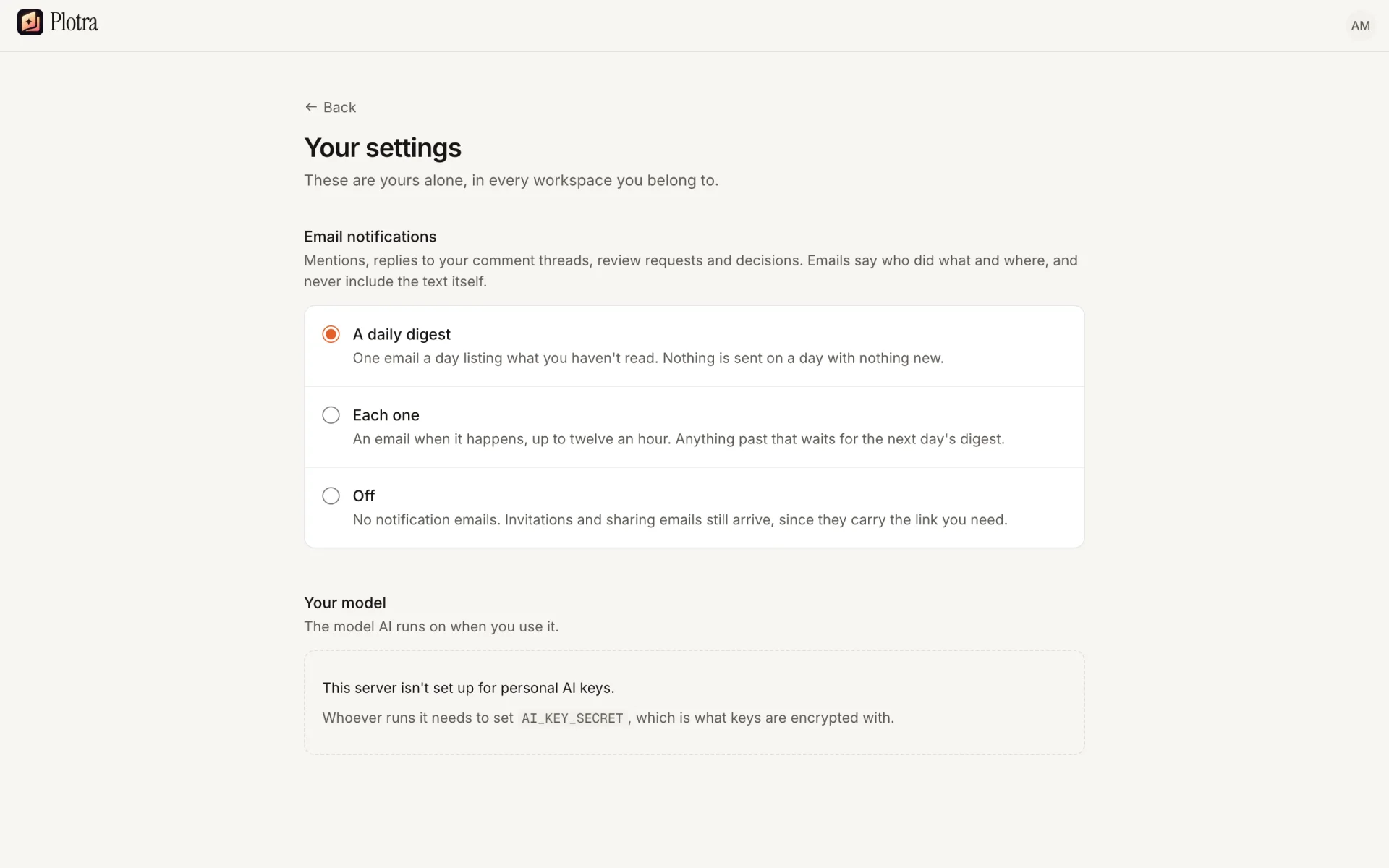
The choice is saved as soon as you click it. It is yours alone and applies in every workspace. Notifications always show under the bell, whatever you choose here; the setting only decides what reaches your inbox.
What the emails cover: mentions, replies to your comment threads, review requests and decisions, and accepted invitations.
What is never held back
Invitations to a workspace and the email that shares a project with you are sent whatever you choose here, because they carry the link you need to get in. A shared project is not mentioned again in the digest.
The digest
- It lists notifications you haven't read and haven't already been emailed about, from the last seven days, newest first.
- It shows up to 20. If there are more, it ends with "And n more."
- Each line is the same sentence the bell shows, linked to the note.
- With one notification, the subject is that sentence. With more, it is "n new things in your Plotra projects".
- Something you have already read under the bell is not emailed.
- Nothing is emailed twice. An item that went out on its own under Each one is not repeated in the digest.
An email for each one
An email goes out a moment after the notification, with the sentence as its subject and a link to the note. It is limited to twelve an hour for each person, so one busy thread can't fill your inbox; the rest arrive in the next digest.
Every notification email ends with a link to your settings, where you can change how often they come or turn them off.
Like the notifications themselves, the emails say who did what and where, with a link, and nothing from the text.
On the hosted version the number of notification emails a day is limited. On a busy day some may arrive in the next day's digest instead; nothing is lost from the bell.
If you host Plotra yourself
The digest is sent when something calls /api/cron/digest with the CRON_SECRET you set, as an Authorization: Bearer header on a GET or POST request. The repository includes a GitHub Actions workflow that does this once a day, at 06:41 UTC; any scheduler that can make an HTTP request works too. Without CRON_SECRET the address answers "Not found" and no digest is sent. Without SMTP_URL emails are written to the server log instead of sent.
Notification emails share a budget of 60 a day for the whole server, on top of the twelve an hour for each person. What doesn't fit waits for the next digest.
Notification settings
There is one setting: how notifications are emailed, described above. There are no switches for single kinds of notification, and nothing to configure for each project. To hear less from a project, the choices are A daily digest or Off.
Everything else on the settings page is covered on Your account and workspaces.
How is this guide?